Clock every smash
A badminton smash speed app that needs nothing but your iPhone: Badminton Sensei measures every smash you hit, in km/h or mph, and tells you how sure it is. Film at 120 fps and the readings are verified.
- Every smash, every match
- km/h or mph
- Verified at 120 fps
- Uncertainty shown
How a phone clocks a smash
No radar gun, no sensor on the racket. Just geometry, time and a lot of frames.
- Step 1
Map the court
Sensei finds the court lines (or you mark the four corners once), so every pixel can be turned into real meters on the floor.
- Step 2
Follow the shuttle
The tracker finds the shuttle in each frame as it leaves the racket, frame after frame.
- Step 3
Distance over time
Distance travelled between frames, divided by the time between them, gives the speed off the racket, not the slower speed at landing.
- Step 4
Say how sure it is
Every reading carries an error range. At 120 fps it's marked verified; when it isn't sure, it says so.
Hit one. See how sure.
A demo gauge with made-up smashes. Change the frame rate and watch the likely range around the needle grow or shrink.
Smash gauge
Demo values, not a measurement
212km/h
likely 199–225 km/h (±6%)
Verified · filmed at 120 fps
Demo values: tap to see a new one.
The band around the needle is the honest part: more frames per second means more positions of the shuttle to measure, so the likely range shrinks. Error figures are the app's rough guide for one camera, not a lab result.
Why the frame rate matters
A hard smash crosses the court in a fraction of a second. At 30 frames per second the camera only catches the shuttle a handful of times on the way, so one position off by a few pixels moves the speed a lot. At 120 fps it catches four times as many positions, and the errors average out.
That's why Sensei shows a speed with its range, and marks readings filmed at 120 fps as verified. A number you can trust to compare week to week is worth more than a big number you can't.
Want to do it by hand? The smash speed calculator works it out from a slow-motion clip, and this guide compares every way to measure.
| Filmed at | Expected error | What it's good for |
|---|---|---|
| 30 fps | about ±20% | Fine for tracking and scoring; speeds are rough. |
| 60 fps | about ±12% | Good enough to compare smashes in one session. |
| 120 fps | about ±6% | Verified speeds. The sweet spot for club play. |
| 240 fps | about ±3% | Tightest readings; bigger files and more battery. |
A rough guide for one phone camera, not a lab specification.
Chase your top smash
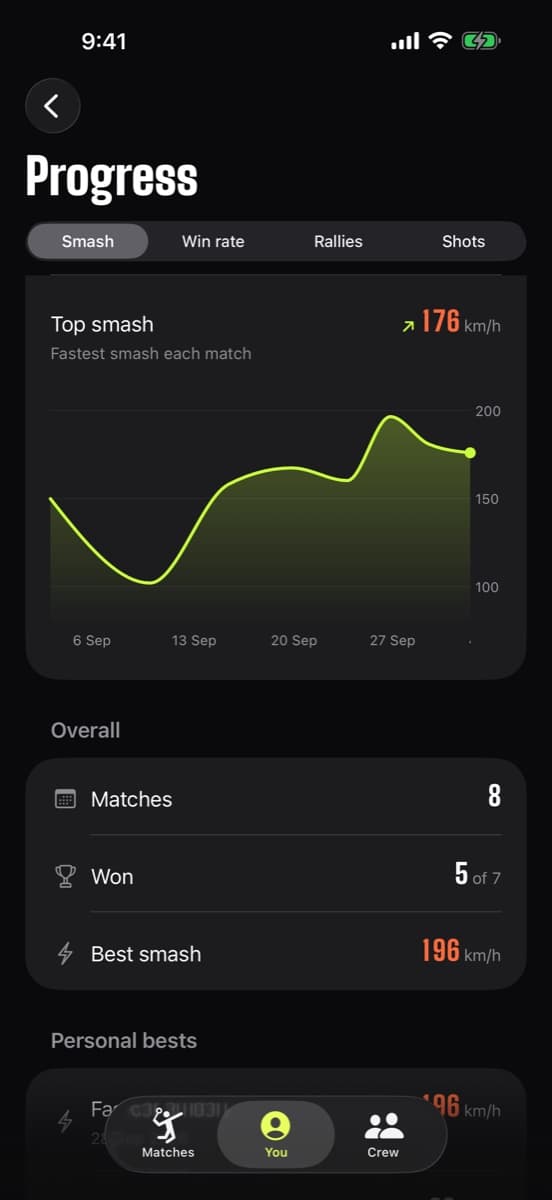
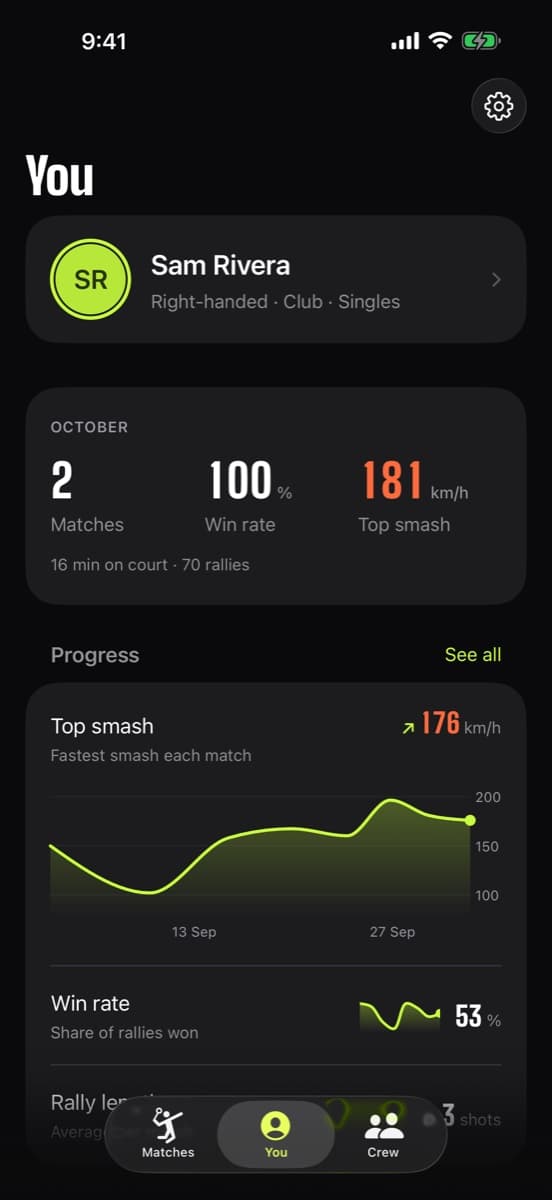
Every smash is saved with its match, so you can see your top speed climb over a season, spot the nights you were tired, and turn a big one into a share card. Switch between km/h and mph in Settings and everything follows, cards and widgets included.
Wondering what's fast? See average smash speed by level and the fastest smashes ever recorded.
- Fastest smash of every match, charted
- Personal bests and streaks
- Smash speed share card
Honest limits
An estimate from one camera
Speed comes from the shuttle's path in a single video. It is not a radar gun, and it shows its error range.
Low frame rates are rough
At 30 fps a reading can be off by around a fifth. Film at 120 fps when the number matters.
Steep smashes toward the camera
Shots coming straight at the lens move less across the frame, which makes depth harder to read from one angle. Filming from behind a baseline, a few feet up, helps.
It has to see the hit
If the shuttle leaves the frame or is hidden by a player right after contact, there is less flight to measure and the reading is less certain.
Set the camera to 120 fps before you film
The filming setup guide covers where to put the phone, how high, and the settings.
Frequently asked questions
Can my phone really measure badminton smash speed?
Yes, as an estimate. Badminton Sensei maps the court, tracks the shuttle frame by frame and divides distance by time. It shows how sure it is, and readings filmed at 120 fps are verified.
How accurate is the smash speed detector?
As a rough guide for one camera, expect around ±20% at 30 fps, ±12% at 60 fps, ±6% at 120 fps and ±3% at 240 fps. The app marks uncertain readings rather than hiding them.
Does it show km/h or mph?
Both. Choose in Settings > Speed, and every speed in the app, on share cards and in widgets follows your choice.
Is the speed measured off the racket or at landing?
Off the racket. A shuttle slows down very quickly, so the speed at contact is the number players compare.
Do I need a special camera or sensor?
No. An iPhone with iOS 26 or later, propped behind a baseline with the whole court in view. No racket sensor, radar or account.
Can I measure smash speed from an old video?
Yes. Import it from Photos. Higher frame-rate videos give tighter readings, and the app shows the range for each one.
Stop guessing. Start seeing.
Find out how fast you really smash. Badminton Sensei traces every shuttle, clocks your smashes, calls the lines and keeps the score, all on your iPhone.
 Coming soon to theApp StoreFree · iPhone with iOS 26 or later
- On-device AICore ML tracking, nothing uploaded
- No account, no adsEvery feature, every match, free
- Works with no signalAny gym, any court